30 Day Free Trial For MCF/FBA Shipping! Use Code 30_days

Still Have a Question?
We're here to help!
Monday-Friday 9AM to 6PM Eastern US time

Time to read: 3 minutes
Ahh yes, variations. Not the simplest idea to understand, but here’s a try.
Within Amazon, products with variations have a “Parent” and “Children” that belong to the Parent. However, at Amazon, these parents are virtual; they are not real. If your “Parents” never came to your baseball games or gymnastic meets, you may have had virtual parents too… But I digress. When it comes to Amazon product variations, understanding this parent-child relationship is crucial.
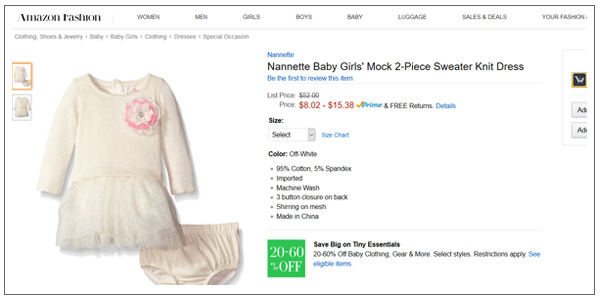
As an example, look up this Amazon fashion product “Nannette Baby Girls’ Mock 2-Piece Sweater Knit Dress”.
You will see the child’s dress in off-white and all of the sizes listed, 0-3 months, 3-6 months etc. These sizes are the variants of the virtual parent. If you scroll down a bit further, you will see the product description with the ASIN listed as: B00XW29R66. Now, you would think that if you searched for this ASIN you would be taken to the same listing as before, and you would be wrong.
Go ahead and go back to Amazon and type in the search box B00XW29R66. Don’t worry, I’ll be here when you come back.

Yep, didn’t find anything did you? Exactly, a virtual parent. Now take one more step, and go to your Seller Central account and add a new product using that same virtual ASIN: B00XW29R66. What the what? It’s there! That’s right, it’s there but once again you cannot add anything for that ASIN, you have to use one of its Children as a listing, and so does ByteStand.
When we pull your inventory into Shopify, we cannot pull something that does not exist, meaning a Virtual Parent. Therefore, what we do is grab all of the real Children for a particular product and then assign the first SKU to be the Parent, and the rest Children of that Parent. This causes chaos when the new virtual Parent starts abusing her newfound authority and bossing around her siblings, but in Shopify, it works great. The only step you’ll have to take is to potentially update the title of the product, but it’s really the only solution possible to Amazon’s virtual family tree.
If you’re wondering how to create product variations on Amazon, this process involves setting up parent-child relationships between SKUs. Each variant (size, color, etc.) gets its own child listing, while the parent SKU acts as a virtual link between them. However, to manage these variations on platforms like Shopify, the virtual parent is replaced by the first child’s SKU.
As a result, the Amazon product listing variations are translated into Shopify-compatible listings, ensuring that customers can view all variants of a product while keeping the SKU management streamlined.
It’s important to understand that the process of listing variations might differ depending on whether you’re using Amazon Seller Central or another platform. However, the core process remains the same — variations are added as child listings under a parent SKU.
About the author


We're here to help!
Monday-Friday 9AM to 6PM Eastern US time
 Call us
 Email Us anytime
 Live Chat in real-time
  Schedule a Video Call

 READ
READ


