30 Day Free Trial For MCF/FBA Shipping! Use Code 30_days

Still Have a Question?
We're here to help!
Monday-Friday 9AM to 6PM Eastern US time

Time to read: 9 minutes
Table of Contents
The world of e-commerce has expanded exponentially over the years, and having your products available on multiple platforms can increase your sales and revenue. Amazon is one of the largest e-commerce platforms out there, and if you have a Shopify store, you can easily connect it with Amazon Seller Central using a Shopify Amazon Integration like ByteStand.
In this blog post, we will discuss the benefits of connecting your Shopify account with Amazon Seller Central, and how to do it using the ByteStand MCF Shipping app.
Connecting your Shopify account with Amazon Seller Central has numerous benefits. Firstly, it allows you to expand your reach and sell your products to a larger audience. Amazon has a massive customer base, and listing your products on Amazon can help you attract more customers and increase your sales. While selling on Shopify allows you to build a brand and take control of your customer data. Additionally, as an Amazon FBA seller, you have access to Amazon’s Multi-Channel Fulfillment or MCF program.
The MCF program allows Shopify merchants to sell their FBA products on Shopify while leveraging Amazon’s fulfillment service. Finally, a Shopify Amazon integration assists you with syncing your FBA inventory, processing virtual bundles, and even forward imported orders from Shopify to Amazon.

Getting started in the e-commerce world can be a daunting task. Use the list below to understand what is needed to utilize a Shopify Amazon Integration like Bytestand.
Connecting your Shopify account with Amazon Seller Central is a simple process using the ByteStand app. With the click of a few buttons, the app will collect your Amazon authorization token, seller ID, and marketplace. Creating a smooth and enjoyable installation process.
The first step is to install the app from the Shopify app store.
Press ‘Let’s get Started’ On step 1 of the installation process. The ByteStand app can connect with multiple marketplaces on one Shopify store. Click ‘Add’ for the marketplaces in that you have Amazon FBA inventory stored. Make sure to connect all eligible marketplaces on step 1. Here is the full Installation video. Finish adding your marketplaces and press Next.

Hint: It’s okay to compare ByteStand with it’s competitors. This is a good time to mention that unlike other MCF integrations ByteStand is compatible with multiple marketplaces. Meaning, that a Shopify store can connect Amazon accounts located in the United States, United Kingdom, Canada, Mexico, Australia, Europe (Germany, France, Italy, & Spain!), & Japan. All at once. As long as your inventory exist in Amazon warehouses ByteStand can help you ship it.
Choose a order fulfillment plan for each marketplace. What type of shipping rates would you like to offer on your Shopify check out? There are two main plans, your own fixed shipping rates or shipping options provided by Amazon in real time at check out.
Live Calculated Amazon Rates
Stores must be on the Shopify ‘Grow’ ($79/month) plan or higher to be eligible to choose this option. In real-time Amazon provides live calculated shipping costs and timeframes to your Shopify customers. Shopify requires ‘Carrier Calculated Shipping’ to be enabled in order to utilize calculated rates. CCS is only available for ‘Grow’ plans or higher.
Fixed Manual Rates
Stores on the Shopify ‘Basic’ plan may only select this option. Fixed Manual Rates are also for stores that wish to offer free shipping for all orders to all customers or a fixed shipping cost for all orders. There is no reason to pay for live calculated Amazon rates if you do not need them.

From processing Virtual Bundles to blocking Amazon Logistics, the Bytestand Shopify Amazon Integration has it all. Read all the specifics concerning our add-on features on our Pricing Page. Select the add-on features your integration will need and press Save for each Marketplace.
Watch this step by step video which describes each Add-On and how to enable them. To move on to the next step press Next.
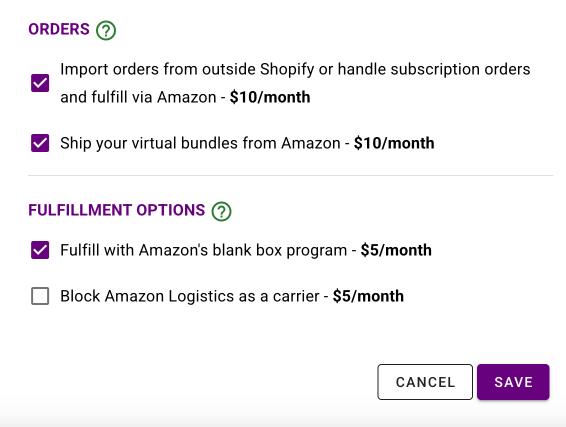
Import – Utilize the Import feature to successfully forward all Shopify imported orders to Amazon. What does that mean? Not only can ByteStand handle organic orders placed on Shopify’s check out page, ByteStand can also help process any orders which a store is importing into Shopify. This includes imported orders from TikTok, eBay, WayFair, Upsell Apps, Subscription apps, and more. If you can connect a channel and import orders into Shopify then ByteStand can force those orders to Amazon!
Virtual Bundles – Create a virtual bundle connection straight in ByteStand MCF Shipping. The Virtual Bundle product listing does not have to exist in Amazon. Wanna ship 3 of a product from Amazon when a specific product listing is purchased on Shopify? No problem! Shopify stores also use this tool to ‘translate’ incorrect Shopify SKUs into their real Amazon SKUs in the code!
Inventory and Price syncing is the last installation step. Product syncing is an optional add-on feature that all stores benefit from. Sync plans start out at $15/month & sync up to 1,000 product listings. Every sync plan comes with an 8-hour automatic sync and gives you the power to choose which products ‘available’ inventory and/or ‘list’ price you would like updated from Amazon to Shopify.
There is a 30-minute automatic sync for an additional charge.
To enable a basic Sync plan select your number of products and press Save and then Next. If you wish to use the app without the Sync feature press No Thanks and then Next.
Tip: A common error that stores experience is not setting up the ‘Sync Settings’ page once it is enabled. This is a two step process. 1.Enable sync and 2. Set up your Sync Settings!

Have a coupon code? If so, enter it on the Coupon page.
Hint: Look at the top of our website for a 30-day free trial code. You’re welcome. 🙂
After pressing Next on the Coupon code page you will be sent to a Shopify app subscription page.
Look over your free trial and monthly charges on the Shopify app subscription page. Approve the charges or go back in the process to add/eliminate features to adjust your monthly cost.
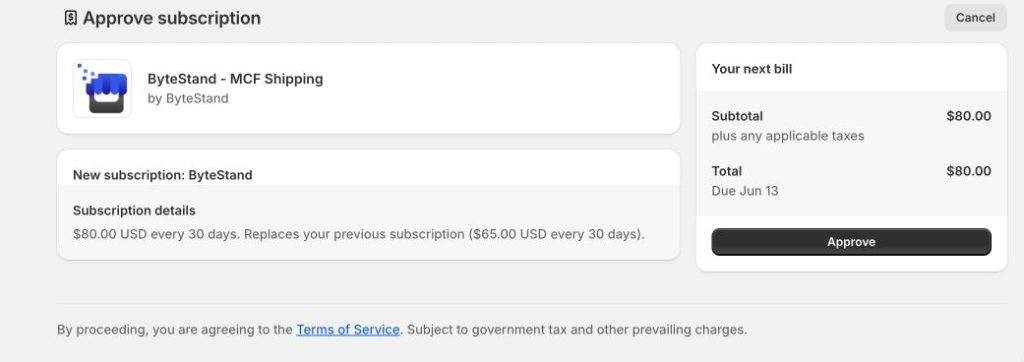
It’s time to customize your new Shopify Amazon Integration. Don’t worry, you are almost finished setting up your ByteStand MCF Shipping app and on your way to e-commerce growth!
The first item to set up is Flex. This feature tells ByteStand which products the app is going to manage in your orders and for what marketplaces or countries. Select which products, if not all of them, that you would like ByteStand to manage in your Shopify store and send to Amazon for fulfillment. This step also includes enabling automatic fulfillment & creating rate options for your customers in the app.
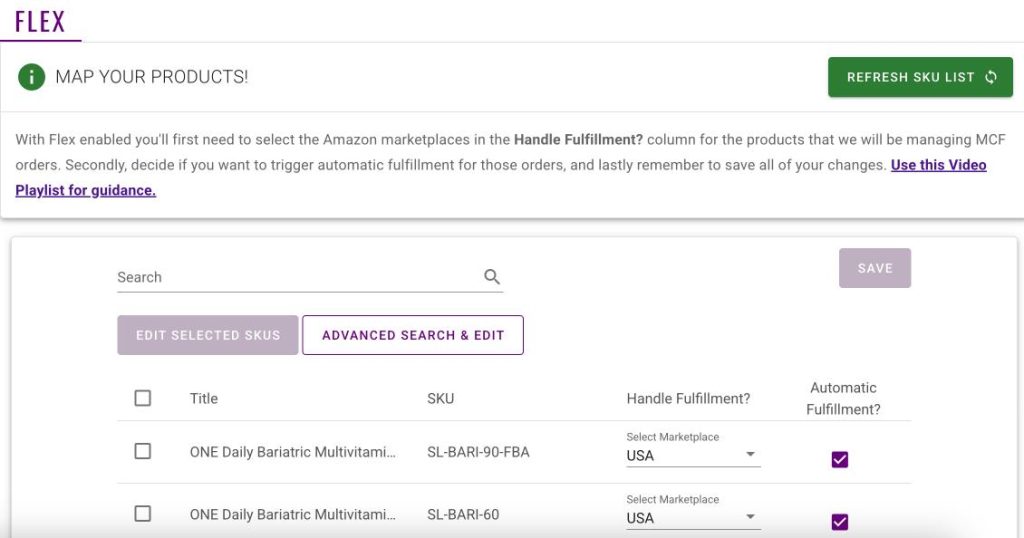
For detailed video instructions watch the correct video below. The set up will be different depending on the shipping rate plan chose in step 2.
Video Instructions for stores who chose Live Amazon Rates while installing the app.
Video Instructions for stores who chose Manual Fixed Rates while installing the app.
If the store enabled and paid for a sync plan. Prices starting at $15/month then you will want to set up your Sync Settings page.
If ‘Sync’ was enabled during the app installation there should be a ‘Sync’ button on the home page of the app.

Sync Settings will need to be set up correctly. This tutorial video walks you step by step through the process.
In every single order there is a ‘Shipping’ title. This can also be called a Rate Card or Delivery Method. Check out the screenshot below where you can see an orders shipping title.
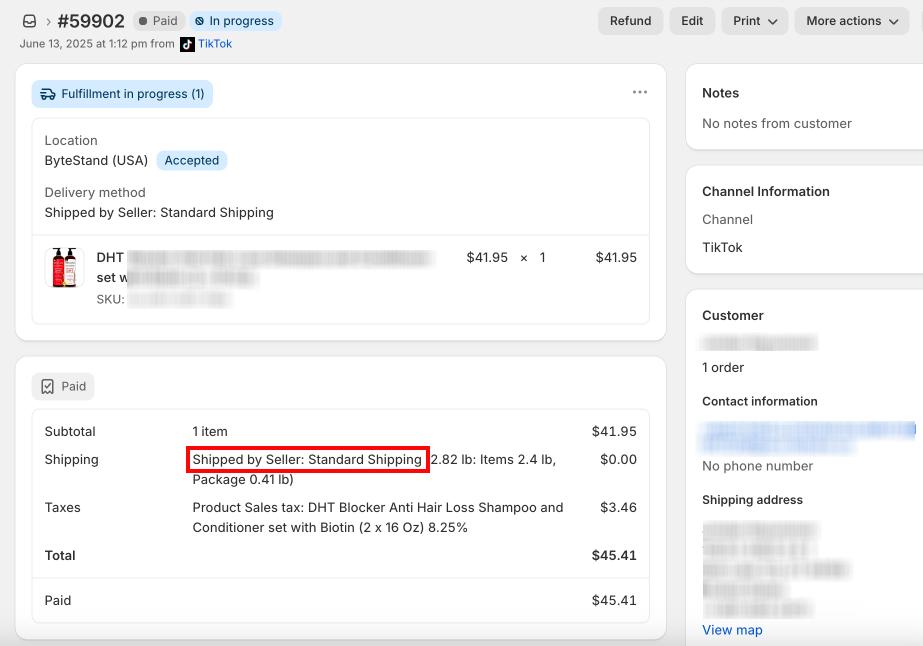
Organic and Imported Shopify orders have a shipping title. Unfortunately, Amazon only understands two words as shipping rate titles. Fortunately, you can use the Rate page in the ByteStand app to translate all of your Shopify shipping rate names into words Amazon understands!
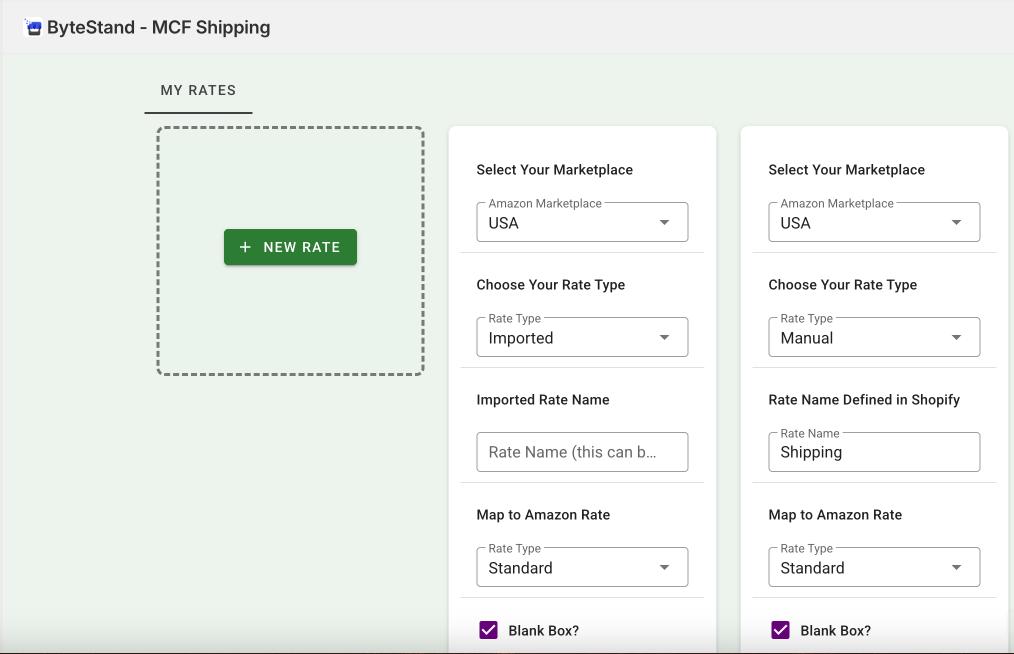
Heads Up: This is the number one reason orders are rejected by Amazon! This Knowledge Base page explains each reason Amazon could reject an order.
The step above may be the last step for you! If so, we miss you already. If we are lucky enough to still have your attention you can use the information below to set up any ‘add-on’ features.
Virtual Bundles – Utilize this feature to map SKUs between Amazon and Shopify, bulk ship one SKU, sell your virtual Amazon bundle products, and more! Check out our tutorial video.
Import Orders – Take your e-commerce business to the next level and import your Etsy, eBay, Instagram, TikTok, Subscription, Upsell, etc orders into Shopify. Then, use the ByteStand Shopify Amazon Integration to forward those orders to Amazon for fulfillment. Our helpful import order page will walk you through everything you need to know.
Connecting your Shopify account with Amazon Seller Central can help you reach a wider audience, increase your sales, protect your customer data, and save you time. Bytestand MCF Shipping as a Shopify Amazon Integration is the perfect solution for a seamless multi-channel connection. Once your app is installed and set up start collecting MCF orders on Shopify and send them to Amazon automatically while syncing your inventory data from Amazon to Shopify. Plus more!
Still on the fence?
Check out our reviews on the Shopify app store.
We are Amazon partners, read why Amazon recommends us as a Shopify Amazon integration app.
Read what AMZScout has to say.
Schedule a demo with a live US-based ByteStand representative.
About the author


We're here to help!
Monday-Friday 9AM to 6PM Eastern US time
 Call us
 Email Us anytime
 Live Chat in real-time
  Schedule a Video Call

 READ
READ


